
DocBunker vs SharePoint
SharePoint or a client portal for external exchanges?
SharePoint or OneDrive for external clients? Compare guest accounts, client uploads, set-up effort and how sharing ends.
 SharePoint
 DocBunker
- 4criteria where DocBunker is better
- 1criteria level
- 2criteria where SharePoint is better
The short answer
Which approach fits your project?
SharePoint and OneDrive are built for the inside of a Microsoft 365 organisation: document management, permissions, Teams integration. External sharing with clients is possible, but it depends on administrator settings and often relies on a guest account or a verification code. A DocBunker folder is simpler when what you need is one space per client, with no account.
This comparison covers sharing with people outside your organisation. External sharing options depend on your Microsoft 365 licence and the rules your administrator has set: check what is enabled in your tenant before deciding.
Everyday differences
On mobile, scroll the table horizontally.
| Your needs | SharePoint | DocBunker folder |
|---|---|---|
| Set-up | Administrator settings, a site or library to structure, permissions to check. | ✓ BetterCreate a folder, then send a link; no administration to plan. |
| Client access | A sharing link, named access with a verification code, or a guest account depending on organisation rules. | ✓ BetterA private link; the client does not need to create an account. |
| Client uploads | Possible with edit rights or a file request, if the administrator allows it. | ✓ BetterThe client uploads files to the folder; uploads can be switched on or off per folder. |
| Governance | ✓ BetterRetention, compliance, audit and advanced integrations for organisations that need them. | A folder activity log and file scanning; no enterprise document governance. |
| Ending the shareEquivalent | Remove access or expire the link depending on settings; downloaded copies stay with the recipient. | Expire or revoke the link from the folder; copies already downloaded stay with the client. |
| Office online and co-editing | ✓ BetterWord, Excel and PowerPoint online, with co-editing. | No document editing; you upload, view and comment. |
| How easy it is for your clients | Depends on the access mode: link, verification code or guest account. | ✓ BetterA link to open: nothing for the client to learn. |
Where DocBunker is better
- Set-up
- Client access
- Client uploads
- How easy it is for your clients
Where SharePoint stays better
- Governance
- Office online and co-editing
Every tool has its strengths: this scorecard compares the use case “exchanging documents with a client”, not the tool as a whole.
A one-off exchange
When SharePoint is enough
Your organisation is already on Microsoft 365, an administrator manages access, and you need compliance, retention or Teams integration. You have few external clients and they accept a guest account.
An ongoing project
When to move to a client folder
You are a small business without a dedicated administrator and you deal with many different clients. A DocBunker folder avoids configuring external sharing and managing guests: one revocable link per client.
Prepare a folderA practical example
Example: an agency delivering and receiving documents
An agency on Microsoft 365 shares its deliverables through a SharePoint site. For each new client it must check external sharing and explain how to open the link or sign in.
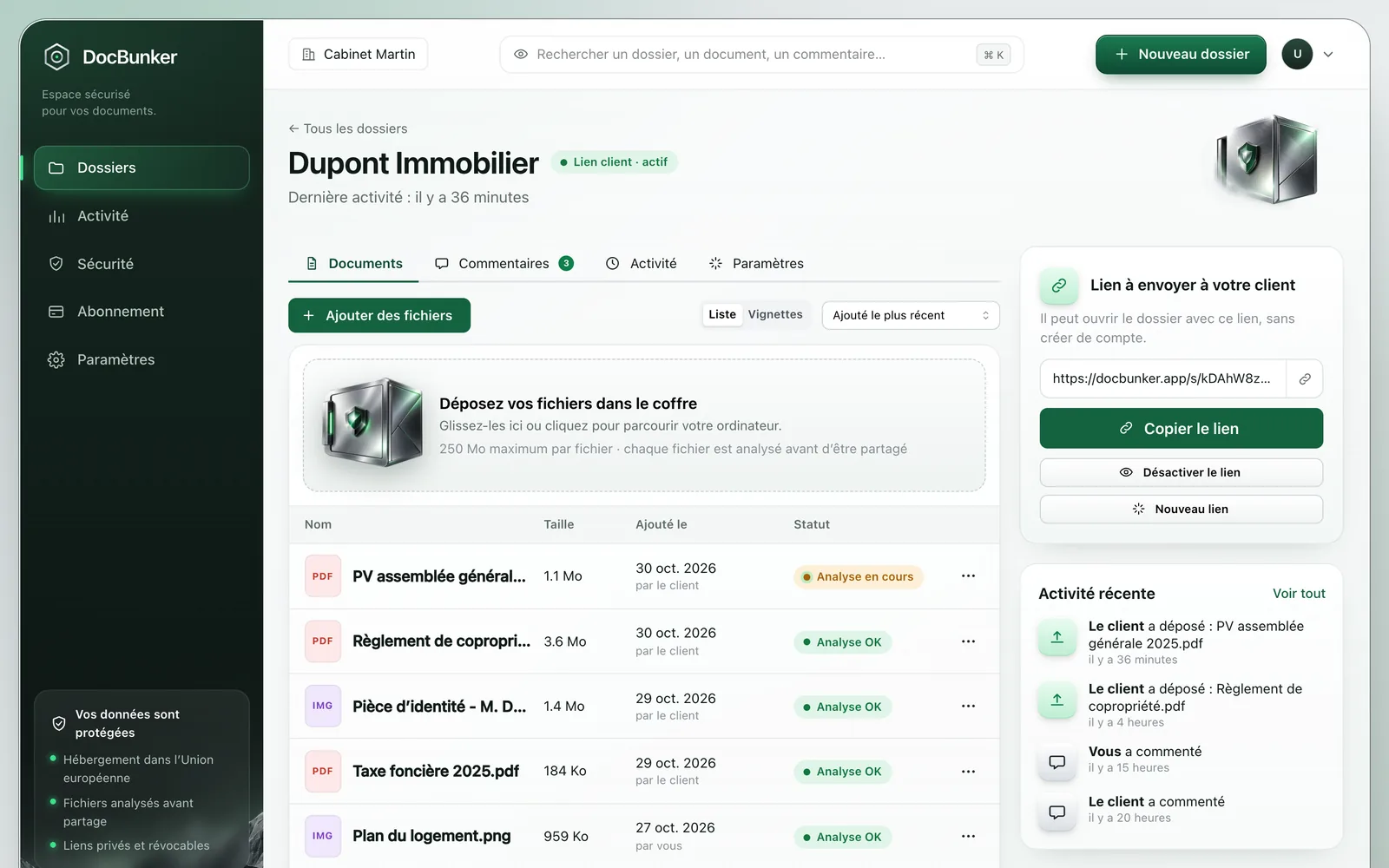
With DocBunker, the agency creates one folder per client, sends a link and receives feedback in the same space. SharePoint stays in use internally to produce the documents.
How to get started
- Keep SharePoint for internal work.
- Create one DocBunker folder per client and add the documents to share.
- Send the link, then revoke it when the project is over.
Anyone holding an active link can access the folder. Choose your recipients and close the link when sharing should end. Recipients keep copies they have already downloaded.
Common questions
Does DocBunker replace SharePoint?
No. SharePoint organises and governs an organisation’s documents. DocBunker handles exchanges with people outside it.
Does a client need a Microsoft account?
Not with DocBunker. With SharePoint or OneDrive it depends on the sharing mode and your administrator’s rules.
How do I remove access to a document already shared?
In DocBunker you revoke the link from the folder. In SharePoint you remove the permissions or the link in the sharing settings. In both cases a copy already downloaded stays with its recipient.

Make client exchanges easier
One folder for the rest of your project.
Keep your preferred channel for messages, with a dedicated place for client documents and feedback.
Create my folder